
Digital kiosks are transforming the way businesses connect with customers. From self-checkout at retail stores to check-in stations at hospitals, these interactive machines are more than just a trend — they are a powerful tool for modern business. But if you want results, you need to know how to design digital kiosks that grab attention, work smoothly, and keep customers coming back.
Why Design Digital Kiosks Is a Game-Changer
Today’s customers want speed, convenience, and control. A poorly designed kiosk can frustrate them and drive them away. On the other hand, when you design digital kiosks correctly, they provide a seamless experience that increases satisfaction, reduces wait times, and drives sales.
Key Takeaways
- Designing digital kiosks the right way improves customer experiences and increases profits.
- Simple interfaces and smart placement make kiosks easy to use.
- High-quality visuals and branding keep customers engaged.
- Secure software and durable hardware protect your investment.
- Regular updates keep kiosks fresh and relevant for customers.
What Does It Mean to Design Digital Kiosks?
To design digital kiosks means creating machines that blend technology, branding, and usability. They’re not just screens — they are customer service stations that run 24/7 without breaks. From selecting the right hardware to customizing the interface, each design choice matters.
Tips for Designing Digital Kiosks
- Use large, easy-to-read fonts and clear buttons.
- Add branding elements like colors and logos for recognition.
- Test your design with real customers before launching.
By focusing on simplicity and brand consistency, you ensure that your kiosk doesn’t just look good — it works.
Who Should Design Digital Kiosks?
Nearly every industry benefits from digital kiosks.
- Retail Stores: Offer self-checkout, loyalty sign-ups, and product information.
- Restaurants: Speed up service with ordering kiosks and touchless payment.
- Healthcare Providers: Streamline check-ins and reduce wait times.
- Banks and ATMs: Provide fast, safe, and convenient self-service.
- Hotels and Airports: Help guests with check-in, ticketing, and directions.
Quick Tip: If your business serves customers daily, a kiosk can make service faster and more professional.
How Designing Digital Kiosks Makes Life Better
When you design digital kiosks, you give customers what they value most: convenience. Instead of waiting in long lines, they handle tasks in minutes. Businesses save on labor costs while offering modern, reliable service.
For customers, kiosks mean less frustration and more control. For businesses, kiosks mean happier clients, increased loyalty, and better sales.
Pro Tip: Pair your kiosks with special promotions or loyalty rewards to encourage repeat use.
Key Elements of Effective Digital Kiosk Design
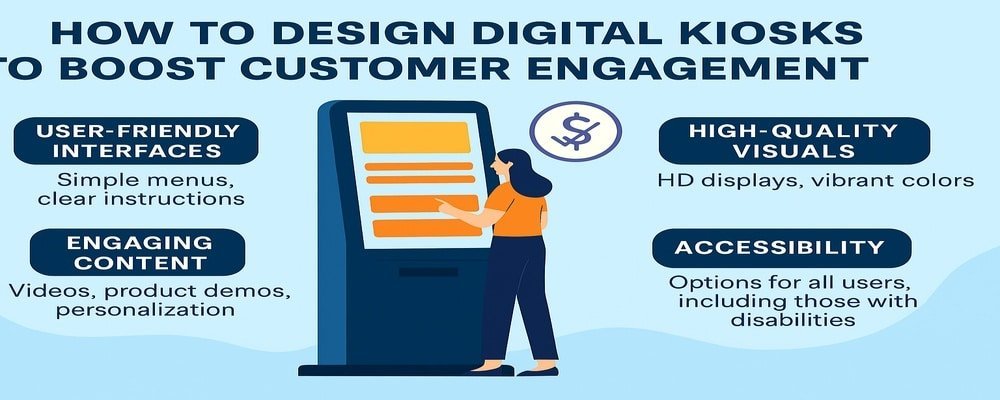
User-Friendly Interfaces
Customers should be able to use kiosks without asking for help. Stick with simple menus, large touch areas, and clear instructions.
High-Quality Visuals
HD screens, bright colors, and sharp graphics make content stand out. If your kiosk looks outdated, customers may not trust it.
Brand Consistency
Always design digital kiosks to match your company’s look and feel. This builds trust and makes your business easy to recognize.
Accessibility for All
Add features like multiple language options, voice guidance, and wheelchair-friendly placement to ensure everyone can use your kiosk.
How to Design Digital Kiosks That Boost Engagement
The secret to high engagement is interaction.
- Add touchscreens for fast, easy navigation.
- Use QR codes so customers can connect to mobile apps.
- Offer video demos or product spotlights.
- Make checkout quick with secure payment options.
- Add personalization features like loyalty program integration.
Design Tip: Keep screens uncluttered. A simple, focused design encourages customers to stay and interact longer.
Mistakes to Avoid When You Design Digital Kiosks
Even the best technology can fail if the design is poor.
- Don’t overload the screen with too much text.
- Avoid outdated software that runs slow or crashes.
- Don’t skip ADA compliance — accessibility is key.
- Don’t neglect content updates. Old information frustrates customers.
Tip: Always review your kiosk content at least once a month to keep it current.
Best Placement Strategies for Digital Kiosks
Where you put your kiosk matters as much as how you design it.
- Place kiosks in high-traffic areas like entrances and waiting areas.
- Ensure they are visible without blocking walkways.
- Position screens at eye level for easy use.
- Avoid hidden corners where customers won’t see them.
Placement Tip: Track usage data. If one kiosk isn’t getting attention, try moving it to a busier spot.
Keeping Digital Kiosks Secure and Reliable
Customers trust kiosks with their payments and personal information. That’s why security is critical.
- Always use encrypted payment systems.
- Schedule regular software updates to prevent hacking.
- Protect hardware with durable casings.
- Add surge protection to keep kiosks running smoothly.
Maintenance Tip: Set a regular schedule for both cleaning and system checks to keep kiosks reliable.
10 Benefits of Designing Digital Kiosks the Right Way
- Faster service and shorter wait times
- 24/7 availability without extra staff
- Accurate orders and transactions
- Increased customer engagement with interactive features
- Secure and convenient payment options
- Lower operating costs
- Professional, modern brand image
- Easy updates for promotions and new products
- Accessibility for all customers
- Valuable customer data collection for better marketing
Lasting Success with Digital Kiosk Design
Designing digital kiosks is more than adding technology — it’s about improving customer experiences and strengthening your business. A well-designed kiosk works as a trusted assistant, guiding your customers and boosting your sales. Don’t let poor design stand in the way of growth.
Ready to design digital kiosks that delight customers and grow your business? Contact us today to start building yours.
FAQs About Designing Digital Kiosks
1. How much does it cost to design digital kiosks?
The cost to design digital kiosks varies by size, features, and software. Most businesses see a strong return on investment within months.
2. Are digital kiosks easy for customers to use?
Yes. When you design digital kiosks with simple layouts and clear instructions, they’re user-friendly for all ages.
3. What industries benefit most when they design digital kiosks?
Retail, restaurants, healthcare, hotels, and banks benefit most, but any customer-facing business can use them.
4. How often should digital kiosks be updated?
It’s best to update digital kiosks monthly with fresh content and perform quarterly system checks.
5. Can I design digital kiosks that handle secure payments?
Absolutely. Modern kiosks use encrypted systems to process payments safely and protect customer data